When Jesus spoke again to the people, he said, “I am the light of the world. Whoever follows me will never walk in darkness, but will have the light of life.
When Jesus spoke again to the people, he said, “I am the light of the world. Whoever follows me will never walk in darkness, but will have the light of life.
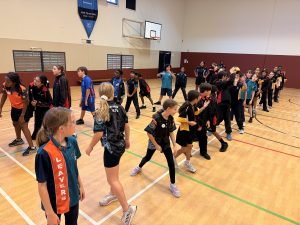
Earlier this term, our Primary School gathered for its first assembly of 2026, and what a joyful way to begin the year. The atmosphere was full of excitement as students reconnected with classmates, swapped holiday stories and settled back into school life.
A highlight of the morning was the announcement of our full Primary Student Leadership Team, who were officially presented with their badges. Each of these students has consistently demonstrated integrity, initiative and a heart to serve, qualities that make them outstanding representatives of our College. We are incredibly proud of them and look forward to seeing the positive influence they will have as they lead by example.
We were also privileged to hear from our 2026 Year 12 Head Boy, Jack J., and Head Girl, Sonia N., who shared thoughtful encouragement and practical advice for our young leaders and those aspiring to leadership in the future.
The assembly concluded with our Chaplain, Mr Timothy Ballantyne, who prayed over the Primary Student Leadership Team and reminded students of the call of the Great Commission, encouraging them to lead with faith, purpose and a heart for others.
For students in Years 7 and 10, the new school year has brought with it more than just a change of classroom. Thanks to the wonderful efforts of the ICT team, students have received their new locked-down MacBook or iPad prior to the start of the term.
The Managed Device Program is an important step toward strengthening online safety and enhancing classroom learning. Below is a quick guide to what families need to know.
What happens if my child’s device needs repairing?
While Apple devices are durable, accidental damage can occur. If your child’s device requires repair, the process is outlined below:
The student reports the issue to Student Services or the ICT Training and Support Technician.
A daily loan device is issued if needed (where available). Loan devices need to be returned at the end of each day.
The device is repaired onsite or sent away under warranty or AppleCare+.
Families are notified when a repaired device is ready for collection.
Any applicable AppleCare+ charges are processed for parent billing.
We appreciate your support in reinforcing the importance of careful handling, safe storage, and daily charging of student devices at home. Devices must always remain in their protective case and should not be transported loosely in school bags.
For questions about device repairs, please contact your School ICT Training and Support Technician.
Optional theft and loss insurance
AppleCare+ is included with all SCEA-leased devices and covers most accidental damage. It does not cover loss or theft. Under the Parent Agreement, families remain responsible for loss, theft, and damage not covered by warranty or AppleCare+.
As previously advised, families may wish to check whether their home contents policy provides cover for their child’s leased device. For those who prefer additional protection, SCEA now offers an optional three-year Theft and Loss Only Insurance Plan through Protecsure (single upfront payment). This option is voluntary and does not change parental responsibility for device care. Cost and coverage details have been provided directly to participating families and are available online here.
Families with SCEA-leased iPads can download the Jamf Parent App to support healthy device routines at home. The App works alongside SCEA’s device management system and cannot override protective settings. Parents can:
Disable the camera or AirDrop.
Set focus timers for apps.
Create morning and evening routines.
For more information about Jamf Parent App and the installed management software on your child’s leased device, refer to the video below.
Keep your eye out for some exciting updates on how Managed Devices are improving classroom learning later this term!
It’s not every day that our College is featured in The West Australian.
With the rapid rise of technology and growing research suggesting young people are developing unhealthy screen time habits, the conversation around student wellbeing has never been more important. In addition, the Australian Government has recently announced a ban on social media access for children under 16. The question many are now asking is: What are schools doing to address this ongoing issue?
TheWest Australian article highlights the Swan Christian Education Association (SCEA) decision to transition from a Bring Your Own Device (BYOD) model to a school-managed device program.
This initiative was implemented at the beginning of this year and initially impacted our Year 7 and Year 10 students. The program will be progressively rolled out across the College, with full implementation anticipated by 2028. Encouragingly, feedback from both parents and staff has been overwhelmingly positive.
At ECC, student well-being remains a top priority. We believe this change not only supports the development of healthier screen time habits but also helps reframe devices as purposeful tools for learning rather than gateways to games and entertainment.
As SCEA CEO Graeme Cross shared in the article, “We don’t want to set up a situation where students actually become so reliant on these devices it creates some form of addiction.”
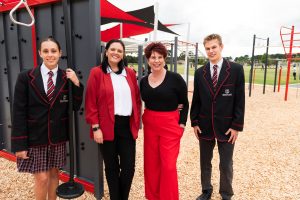
It was exciting to welcome The West Australian team onto campus, with several of our Secondary students stepping confidently in front of the camera. We are proud to see ECC leading the way in fostering healthy digital habits and prioritising student well-being.
To read the full article, click on the image below.